Serendipify.Me group + LMS Integration Setup
Make sure you are familiar with the concepts: /login/lti/docs
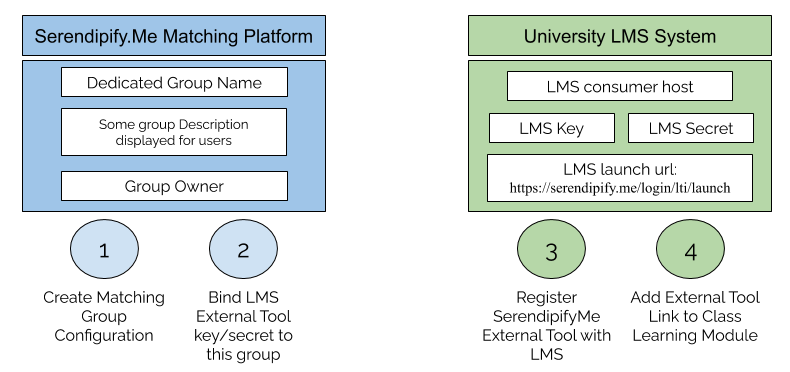
IMPORTANT: For every group, you will have to configure two components: a Serendipify.Me group and the corresponding LMS External Tool configuration.
Configure the Serendipify.Me LTI-Enabled-Group below:
1. Set up the SerendipifyMe Matching Group
SerendipifyMe lets you define and manage a matching instance for your targeted group of people:
1.A: Choose a name for your matching instance
1.B: Provide a meaningful group description
This helps the people that you invite into this search group to understand the purpose, the participants, and the best criteria for them to discover interesting and valuable partnerships.
This helps the people that you invite into this search group to understand the purpose, the participants, and the best criteria for them to discover interesting and valuable partnerships.
1.C: Who owns this group?
You need to use your organization/school provided email address, to be able to automatically manage this group (same as LMS Consumer Host entry above)
You will own and manage this matching group, and the corresponding LMS integration keys.
You need to use your organization/school provided email address, to be able to automatically manage this group (same as LMS Consumer Host entry above)
You will own and manage this matching group, and the corresponding LMS integration keys.
2. Configuration for the LTI integration
Your university's LMS will consume this information when you configure an External Learning Tool
2.A: LMS Consumer Host:
(your universitie's top-level Internet domain name)
2.B: Enter or generate the LTI keys:
LMS Launch URL:
(your universitie's top-level Internet domain name)
2.B: Enter or generate the LTI keys:
LMS Launch URL:
FYI: Matching Group Link which will be launched transparently by LMS:
(Generated Dynamically. Not needed anywhere in the configuration process)
(Generated Dynamically. Not needed anywhere in the configuration process)